
Help
Scanning with the camera
Scanning runs entirely on your device using Apple's Vision framework. Nothing is uploaded, and it works with no internet connection at all.
What the camera actually reads
When you scan, RateBud looks for three things at once:
- A barcode — the most reliable identifier of all.
- The text printed on the label, read by on-device OCR.
- The general look of the item, as a visual fingerprint.
It then checks all three against everything already in your library.
Matching against what you already have
The point of matching is to stop you ending up with four entries for the same coffee.
- If RateBud recognises something you've rated before, it offers to add a new review to that existing item.
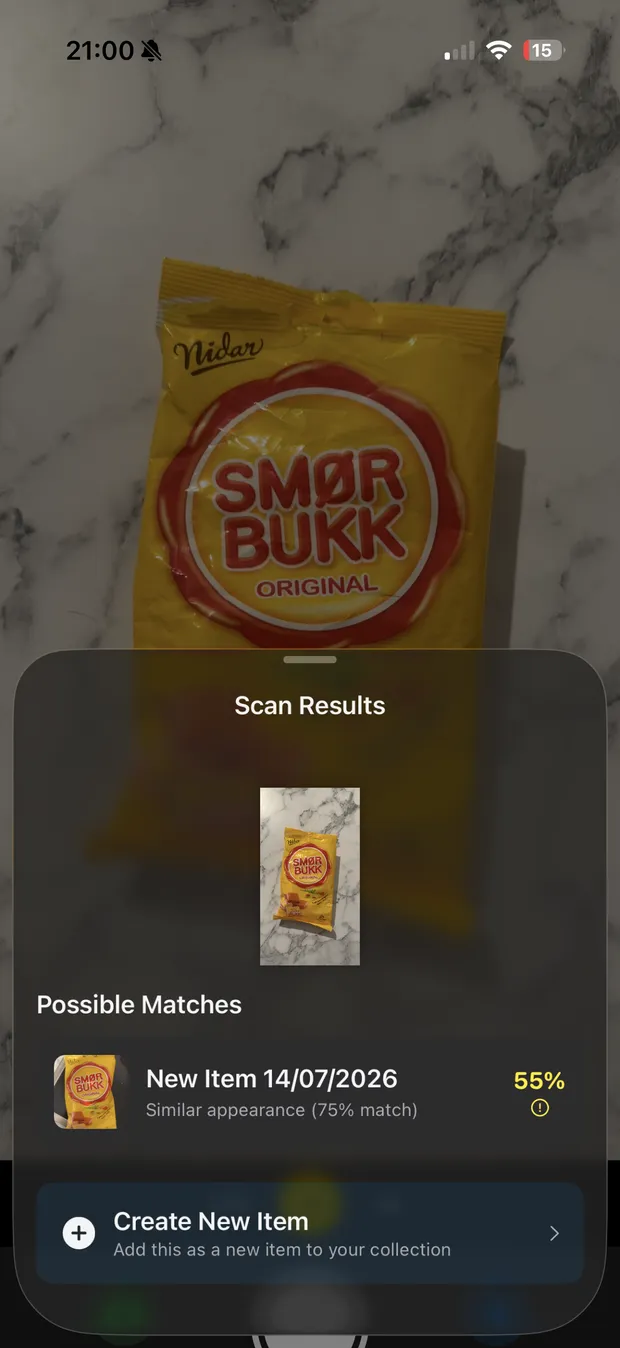
- If several items look plausible, it shows them with a confidence indicator and lets you choose.
- If nothing looks familiar, it suggests a name and creates a new item.
You can always ignore the suggestion and choose Create New instead.
Getting a better scan
- Light matters more than anything else. RateBud discards blurry and badly lit frames rather than guessing from them, so in poor light it may simply keep waiting.
- Fill the frame with the label. Text read from across a room isn't text.
- Aim for the barcode when there is one.
- Hold still for a moment. The app is reading, not just photographing.
- No packaging? Skip the scan, add the item manually, and attach a photo afterwards.
What a scan stores
An item keeps the barcode and detected text from its scan, which is what lets future scans recognise it. You can see both — and clear them — under Item Settings on the item's own page. Clearing scan data is the fix if one bad scan is causing repeated mismatches.